Imagine this: You’ve just landed a prime sponsorship opportunity. Your logo will be printed on a 20-foot banner hanging in a packed convention center. Thousands of eyes. Potential clients everywhere. The printer asks for your logo file, and you send the same JPEG you’ve been using on your website since day one. A few days later, the banner arrives. Your logo is a blurry, pixelated mess. Your brand looks amateurish, and you’ve just spent thousands to advertise a graphic disaster.
I’ve seen this exact scenario play out more times than I can count. The root cause is always the same—the business didn’t have a vector logo. They had a raster image, a file built with pixels that completely falls apart the moment it’s scaled beyond its original size. A vector logo would have saved them.
If you’re running a business, your logo is the face of your brand. It lives on your website, social media, business cards, packaging, merchandise, and possibly a 20-foot banner. It must be sharp, professional, and infinitely adaptable. That’s not a nice-to-have; that’s a requirement. A vector logo delivers exactly that.
In this post, we’re going deep into what a vector logo is, why it’s non-negotiable, and how it can save you from costly, reputation-damaging mistakes. I’ll share real experiences, hard data, and clear comparisons so you’ll never again confuse file formats or settle for a logo that can’t grow with your business.
What Is a Vector Logo? (And Why Most People Get It Wrong)
Before we dive into the benefits, let’s clarify what a vector logo actually is—because a shocking number of businesses don’t know. I can’t tell you how many times a client has sent me a “vector file” only for it to be a PNG saved inside an EPS wrapper. (Yes, that’s a thing, and no, it’s not a vector.)
A vector logo is a graphic built using mathematical equations—points, lines, curves, and shapes—rather than a grid of colored squares (pixels). Because it’s math-based, it can be scaled to any size without losing an ounce of quality. Scale it to the size of a billboard or shrink it to fit a pen: the edges remain perfectly crisp.
Common vector file formats include:
- .AI (Adobe Illustrator)
- .EPS (Encapsulated PostScript)
- .SVG (Scalable Vector Graphics)
- .PDF (when saved with vector data intact)
The opposite of a vector is a raster image. Raster files—like JPEG, PNG, GIF, or TIFF—are made of a fixed number of pixels. Enlarge them beyond their native resolution, and you’ll see jagged edges, blurriness, and that unmistakable “pixelated” look.
I often explain it this way: A raster image is like a mosaic made of tiny tiles. If you try to stretch the mosaic to cover a larger area, each tile gets bigger, and the picture becomes blocky. A vector is like a perfectly sharp blueprint that can be reproduced at any scale. If you only remember one thing from this article, remember: A vector logo is your brand’s insurance policy against pixelation.
Raster vs. Vector: A Side-by-Side Comparison
To make the differences crystal clear, here’s a quick-reference table. Keep this handy—it’ll save you a headache next time a printer asks for “artwork in vector format.”
| Feature | Raster Logo (JPEG/PNG) | Vector Logo (AI, EPS, SVG, PDF) |
|---|---|---|
| Scalability | Limited. Enlarging causes pixelation and blur. | Infinite. Scales to any size with perfect sharpness. |
| File Structure | Grid of pixels, each with a fixed color. | Mathematical paths, points, and curves. |
| Resolution Dependent? | Yes. Quality is tied to pixel count (e.g., 72dpi, 300dpi). | No. Resolution-independent; always outputs at the maximum capability of the display/printer. |
| Editability | Hard to edit individual elements without distortion. | Easily editable—colors, shapes, text can be changed independently. |
| File Size | Can become very large at high resolutions. | Typically much smaller, especially SVG files. |
| Best Use Cases | Digital photography, detailed web images where scale is fixed. | Logos, illustrations, typography, signage, embroidery, any design requiring flexibility. |
| Transparency Support | PNG supports transparency; JPEG does not. | Fully supports transparency natively. |
Visual aid: [Insert infographic showing a pixelated zoomed-in raster logo vs. a crisp vector logo at the same magnification]
A vector logo isn’t just a “different format”—it’s an entirely different philosophy. One is a snapshot frozen in time and resolution. The other is a living, infinitely adaptable asset.
7 Undeniable Reasons Every Business Needs a Vector Logo
Now for the meat of the matter. I’ve narrowed the argument down to seven concrete, real-world reasons. Whether you’re a solopreneur or managing a growing enterprise, these points will hit home.
1. Infinite Scalability Without Quality Loss
Your logo needs to work everywhere—from a tiny favicon in a browser tab to the side of a delivery truck. A raster logo simply can’t stretch that far. A vector logo can.
When you save a logo as a vector, you’re not storing an image at a specific size; you’re storing instructions on how to draw it. Those instructions remain the same whether the output is 10 millimetres or 10 metres wide. This scalability is why professional designers always create logos in Adobe Illustrator or similar vector software. According to Adobe’s own guide on vector files, vectors “can appear at any size or resolution with the same crispness and clarity.”
Personal experience: I once worked with a coffee roaster who launched with a logo created in Canva and downloaded as a PNG. It looked fine on Instagram. Then they wanted to wrap their delivery van. The print shop asked for a vector file; they had none. The result was a pixelated logo stretched across the side of a vehicle, and a very expensive re-wrap later. Don’t let that be you.
2. Perfect for Print and Production
If you ever plan to print your logo—and you will—vector is non-negotiable. Professional printing processes often require vector artwork to produce crisp plates, screens, or vinyl cuts.
Sign makers, screen printers, embroiderers, and promotional product companies almost universally request vector files. Printful, a leading print-on-demand service, clearly states in their design guidelines that vector files are preferred because they “allow us to adjust your design without losing quality.”
Why? Because vector paths can be accurately reproduced by machines that read outline paths—like vinyl plotters that cut lettering for shop windows, or CNC routers that carve signage. Without a vector logo, you severely limit your ability to produce high-quality physical branding materials.
3. Smaller File Sizes, Faster Websites
This one surprises many people. A high-resolution raster logo intended for print might be 10MB or more. A vector version of the same logo, saved as an SVG, can be just a few kilobytes. That’s not a typo.
SVG (Scalable Vector Graphics) is the ideal format for logos on the web. Because it’s code rather than a flat image, an SVG file loads almost instantly and remains razor-sharp on retina displays, 4K monitors, and mobile devices. Google’s Web Vitals place a heavy emphasis on page speed, and using SVG logos directly contributes to a faster, higher-ranking website. MDN Web Docs notes that SVG is “resolution-independent and can be scaled without loss of quality, making it perfect for responsive design.”
By placing a vector logo in SVG format on your site, you’re ensuring your brand mark looks flawless on every screen while keeping your load times minimal.
4. Easy Editing and Future-Proofing
Businesses evolve. You might decide to tweak your logo’s color palette, adjust the spacing, or isolate the icon for use as a favicon. With a raster logo, that means painstakingly erasing backgrounds or trying to recolor a flat, pixelated mess. With a vector logo, it’s a few clicks.
In Adobe Illustrator, you can easily change the fill color, adjust anchor points, or export only the icon portion. This editability makes your logo a future-proof asset. When you eventually need a one-color version for an invoice, a reversed-out white version for a dark footer, or a badge layout, a vector logo lets you create these variants in minutes.
I can’t count how many times a client has come to us at NixGlow Studio needing a simple color swap for a new website, only to find their original designer gave them nothing but flattened JPEGs. We end up recreating the logo as a vector from scratch—a service we’re happy to provide, but one that’s entirely preventable.
5. Seamless Brand Consistency Across Platforms
Brand consistency builds trust. Research by Marq (formerly Lucidpress) found that consistent brand presentation across all platforms increases revenue by up to 33%. A major enemy of consistency? A logo that looks different in different places because the file quality varies.
A vector logo ensures that whether someone sees your brand on a massive billboard, a smartphone screen, or a pen, the logo looks identical—crisp, correctly proportioned, and in the exact right color. You can export from one master vector file to any needed format (PNG for social, SVG for web, EPS for merchandise) while maintaining perfect fidelity. That master file becomes the single source of truth for your entire visual identity.
6. Versatility for Merchandise and Swag
One day you might want to put your logo on a t-shirt. The next, a ceramic mug, a USB drive, or an embroidered cap. Each substrate has different requirements. Embroidery needs defined outlines that a digitizing machine can read. Screen printing requires separated colors. Laser engraving relies on clean vector paths.
A vector logo makes all of this possible without redraws. You can quickly separate elements, convert to outlines, or supply the exact file an embellishment vendor needs. I’ve seen small businesses absolutely stuck when they wanted to give away branded merchandise at a conference but had only a low-res JPG. The vendor couldn’t use it, and they missed a massive networking opportunity. A vector logo in your back pocket avoids that completely.
7. Professionalism and Credibility
This might be the most important point of all, and it’s not even technical. A pixelated logo screams amateur. It tells potential customers, partners, and investors that you cut corners, that you’re not detail-oriented, that you’re not quite serious.
I’ve personally observed users on design critique forums and social media point out pixelated logos immediately. In a world where perceived credibility is formed in milliseconds, your logo is often the first signal. A crisp, scalable vector logo communicates professionalism, care, and permanence. It silently says, “We belong here, and we paid attention to the details.” That matters more than any feature list.
The Real Cost of Not Having a Vector Logo
Numbers and features are great, but let me tell you a story that still makes me wince.
A few years ago, a small but ambitious fitness apparel brand approached me. They had built a decent following on social media with a logo they’d paid $50 for on a freelance platform. It was a high-resolution PNG, and on Instagram, it looked bold and clean. Then they got an opportunity to have their logo placed on the back of a major marathon’s official participant shirt—massive exposure.
The apparel printer requested a vector file. They didn’t have one. The printer tried to use the PNG, and the result was a blurry, off-color mess on the sample. They couldn’t meet the deadline, lost the partnership, and the marathon season came and went. The tangible cost wasn’t just the reprint—it was the lost brand exposure and the strained relationship with an event organizer. All for want of a vector logo.
What’s the real cost? It could be a ruined tradeshow display, a scrapped vehicle wrap, a missed merchandise run, or simply the slow erosion of your brand’s perceived value every time someone squints at a pixelated social media banner. A vector logo costs relatively little to create or convert, yet its absence can cost you thousands in lost opportunity and rework.
How to Get a Vector Logo (And Verify It’s Real)
So you’re convinced. Now what?
1. Start fresh with a professional designer.
If you’re in the early stages, ensure your brand designer delivers final files in AI, EPS, SVG, and PDF formats. At NixGlow Studio, every logo project includes a full vector source file package as standard, because we know that’s what a serious business needs. Ask any designer upfront: “Will I receive fully editable vector files?” If the answer is no, run.
2. Vector conversion of an existing logo.
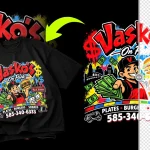
If you already have a logo but only in raster format, don’t despair. A vector conversion service can manually redraw your logo as a clean vector. This is not a one-click “auto-trace” job—those produce wonky results that still look unprofessional. A skilled designer will reconstruct your logo with precise curves and editable text. We do this routinely at NixGlow, and the difference is night and day.
3. Learn to check if a file is truly vector.
Received a file with an .eps or .pdf extension? It might still be a raster image trapped inside a vector container. Here’s a quick test: open the file in Adobe Illustrator or a free vector editor like Inkscape. Zoom in to 600%. If the edges remain razor-sharp and you can select individual shapes, it’s a true vector. If it turns into a blocky mess, it’s a raster in disguise.
4. Use online marketplaces with caution.
You can purchase vector logos from stock sites, but they often come with licensing restrictions and can’t be trademarked. A unique, custom vector logo designed specifically for your brand will always be the superior long-term choice.
Your Vector Logo: A Cornerstone, Not an Afterthought
After over a decade working with brands of all sizes, I’ve learned that a business’s logo file format is one of those invisible details that either quietly supports your growth or suddenly derails it at the worst possible moment. A vector logo isn’t just a designer’s preference—it’s a fundamental business asset. It’s the master key that unlocks every physical and digital application your brand will ever need.
If you’re reading this and realizing your only logo file is a JPEG your cousin designed five years ago, take a breath. It’s an incredibly common situation, and it’s fixable. The important thing is to act before you’re facing a print deadline.
We’ve seen what happens when you don’t have a vector. The oversized banner that becomes a joke. The truck wrap that you have to pay for twice. The merchandise that can’t be produced in time for the event. The slow, quiet damage of looking unpolished in a polished marketplace.
On the other side, having a crisp, scalable, editable master file means you can say “yes” to any brand opportunity instantly. Yes, you can sponsor that event. Yes, you can put your logo on those recycled water bottles. Yes, you can update your website with a perfectly sharp header. Your brand becomes ready for anything.
Ready to Future-Proof Your Brand?
If you’re ready to equip your business with a professional vector logo—or need an existing logo converted to clean vector format—NixGlow Studio is here to help. We’ve guided countless brands through this exact journey, from pixelated panic to vector victory.
👉 Contact us today to discuss your logo design or vector conversion project.
📸 See our latest brand transformations on Instagram @nixglowstudio
🎥 Dive deeper into design tips and tutorials on our YouTube channel
Don’t let an invisible file format hold your business back. A vector logo is a small investment that pays for itself every time you print, post, or present your brand to the world. Make the switch. Your future 20-foot banner will thank you.