You have a logo file. It looks fine on screen but turns blurry when you enlarge it. Maybe it’s a JPEG from 2012, or the only copy is a tiny PNG. You need it sharp enough for a banner, a shirt, or a business card. Now you hear two terms: vector tracing and redrawing. They sound similar. But they are not the same service, and choosing wrong can waste time and money.
In this article, you’ll learn what sets vector tracing apart from redrawing a logo. You’ll see typical costs, when to pick each method, and how to get professional results without guesswork. No fluff, just clear answers.
What Is Vector Tracing?
Vector tracing turns a raster image (like a JPG or PNG made of pixels) into a vector file. A vector file uses mathematical paths instead of dots. So you can scale it to any size without losing quality. Think of it as creating a clean, digital outline of your original logo.
A designer opens your image in software like Adobe Illustrator. They manually draw paths over the shapes, letters, and symbols. The goal is to match the original design exactly. Colors, proportions, and placement stay the same. The only thing that changes is the file type. You end up with formats like AI, EPS, SVG, or PDF.
Automatic tracing tools exist, but they produce rough edges and misplaced anchor points. Professional manual tracing keeps curves smooth and details crisp. It works best when your source image has clear, high-contrast edges and no major damage.
What Does Redrawing a Logo Mean?
Redrawing a logo means rebuilding it from scratch. Instead of tracing what’s there, a designer studies your original concept and recreates it as a fresh vector file. They may refine shapes, adjust spacing, fix distortions, or clean up years of wear and tear. The new version stays true to the brand identity but looks polished and professional.
This route is common when your only copy is a faded scan, a photo of a sign, or a low-resolution file missing fine details. Redrawing involves creative decisions. The designer interprets blurred areas, rebuilds lost elements, and ensures every line is intentional. The final output is a fully scalable, editable vector logo that feels original and crisp.
Vector Tracing vs Redrawing: What’s the Difference?
Understanding the core differences helps you choose the right path. Here’s a closer look.
The Process
Vector tracing follows the existing shapes. The designer traces paths directly over your image. It’s a precise replication job. Redrawing involves interpretation. The designer may need to reconstruct parts they can’t clearly see. They apply design skills to balance, align, and perfect each element.
Quality and Accuracy
Tracing preserves your logo as it is, flaws and all. If the original has rough edges or slight misalignments, those carry over. Redrawing allows you to fix those issues. You get a cleaner result that might even look better than the first version. But if you want an exact copy with no design changes, tracing is the better fit.
Time and Effort
A clean, simple logo can be traced fairly quickly. Complex artwork, many colors, or detailed text adds time. Redrawing almost always takes longer. The designer needs to study the old image, make judgment calls, and perhaps present a couple of refined options. More creative effort means more hours.
Cost
This leads directly to the next big question: what costs more?
When Should You Choose Vector Tracing?
Choose vector tracing when you have a usable digital file. Maybe it’s a PNG with a transparent background, a clear JPG, or a flat scan without heavy compression artifacts. You can see the edges. The design is already final. You just need it in a vector format so it won’t pixelate.
Common situations:
- You have a logo file that prints fine on letterheads but blurs on a trade show banner.
- Your web logo needs to become a cut file for vinyl decals.
- A client sends a clean image and asks for “the vector version.”
If the design is solid and all you lack is scalability, vector tracing solves the problem fast and affordably.
When Is Redrawing a Logo the Better Option?
Redrawing becomes necessary when the original file is too damaged or low in quality for an accurate trace. If you can count the pixels on one hand, tracing won’t save you. The computer can’t guess missing details, and a manual trace would still produce a jagged mess. A human designer can.
You’ll want a redraw if:
- Your logo exists only as a photograph of a storefront sign, with glare, skew, and shadows.
- The scan is a faxed copy from 1995, covered in dust and noise.
- The design has intricate gradients, fine lines, or overlapping elements that blur together.
- You plan to modify the logo slightly while preserving the overall feel.
Redrawing gives you a brand-new vector file. It’s built to modern standards. It can also become a master file for future edits, color variations, and multiple layouts.
Vector Tracing vs Redrawing: Which Costs More?
In the U.S. market, redrawing a logo usually costs more than tracing it. That’s because redrawing requires deeper design work, not just replication.
A simple vector trace of a one-color logo might range from $15 to $50. Moderate complexity, like three colors or detailed typography, could fall between $50 and $100. Highly intricate artwork may reach $150, but the work still follows a clear source.
Redrawing often starts around $50 for very basic rebuilds. More typical projects, where the designer reconstructs blurred elements and refines shapes, run from $75 to $200 or more. If the logo includes custom lettering, gradients, or complex symbols, expect to invest in quality.
Factors that influence price:
- Source file quality (worse images demand more redraw time)
- Number of colors and layers
- Turnaround time (rush jobs cost extra)
- Revisions included
At NixGlow Studio, we’ve handled thousands of logo projects. Our clients tell us they save money long-term by picking the right service from the start. A cheap auto-trace often needs a manual fix later. Getting a professional result the first time cuts stress and repeat fees.
How to Get Professional Logo Vectorization or Redrawing
Follow these steps to get a vector file you can use anywhere.
- Gather the highest-resolution source file you have. Even a slightly better image can save design hours.
- Decide if you need an exact copy (tracing) or a rebuilt, improved version (redrawing).
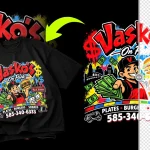
- Find a designer or studio that shows before-and-after examples. Look for crisp paths and smooth curves, not wobbly auto-traced lines.
- Share your intended use. Mention if you need an AI file for a printer, an SVG for a website, or an EPS for a sign shop.
- Confirm the deliverables. You should receive scalable vector formats and a preview file.
Check out our vector tracing services to see how we handle everything from simple traces to full logo rebuilds. We manually create paths, never rely on auto-trace alone, and deliver files that print perfectly at any size.
Common Mistakes to Avoid
A little knowledge prevents big headaches. Avoid these pitfalls.
- Using auto-trace and calling it done. One-click tools produce messy files with too many anchor points. Printers and sign makers see the difference.
- Expecting magic from a bad source. If your image is 100 pixels wide, even the best designer will need to redraw, not trace.
- Skipping a proof check. Always open your new vector file at 100% zoom. Look for gaps, color shifts, and uneven lines.
- Confusing the two services. Asking for a “trace” when you really need a redraw leads to disappointment and extra costs.
Know what you need before you order. A clear brief saves everyone time.
Related Posts
- Custom Bootleg Rap T-Shirt Design 90s Vintage Style

- Custom Bootleg Rap T-Shirt Design Service | 90s Vintage Style | Photoshop Expert
- I will design a vintage bootleg rap t-shirt with 90s hip hop streetwear style

- I will design a custom vintage 90s bootleg rap t shirt
- I will design a premium bootleg rap t-shirt with vintage hip hop aesthetic
- I will create custom 90s vintage bootleg rap and sports t shirt design

Frequently Asked Questions
What’s the difference between vector tracing and redrawing a logo?
Vector tracing creates an exact vector replica of an existing raster image. Redrawing rebuilds the logo from scratch, often improving quality and fixing flaws. Tracing copies; redrawing recreates.
Can I just use a free online tool to trace my logo?
Free auto-trace tools rarely produce clean, professional results. They add unnecessary anchor points, miss sharp corners, and create uneven curves. Manual work by a vector artist is the industry standard for commercial use.
How much does logo vectorization cost in the U.S.?
Basic tracing ranges from $15 to $100 depending on complexity. Redrawing typically starts at $50 and can go up to $200 or more for intricate designs. Always get a quote based on your actual file.
Will vector tracing fix my blurry logo?
No. If your source image is blurry, tracing will create a sharp but distorted copy. Only redrawing can reinterpret unclear areas and produce a clean final file.
What file formats will I receive?
Standard deliverables include AI, EPS, SVG, and PDF. You may also get a high-resolution PNG for quick use. Confirm formats with your designer ahead of time.
Get Your Logo Print-Ready Today
Vector tracing vs redrawing a logo doesn’t have to be confusing. Start by looking at your source file. Clear image, final design? A professional trace works. Pixelated, damaged, or needing a refresh? Invest in a manual redraw.
The right choice saves you from blurry prints and wasted money. At NixGlow Studio, we’ve helped businesses across the U.S. turn their old logos into crisp, scalable vector assets. See our portfolio for real before-and-after examples, or contact us for a free quote today.